Key Takeaways
- Mobbin connects compatible AI clients with real app screens and design patterns through an MCP server.
- The connection supports design research, comparison, and evidence-led discussion within an AI workflow.
- Teams can use Mobbin to explore patterns for onboarding, paywalls, dashboards, empty states, navigation, and other common product experiences.
- MCP improves access to context, but product strategy, originality, accessibility, and final design decisions still require human judgment.
An MCP server is the application-side service that makes an app’s data, search capabilities, and actions available to compatible AI tools. For design teams, what is MCP server becomes a practical question of context: how can an AI assistant access useful visual references without requiring someone to manually search, screenshot, upload, and explain each example?
Mobbin addresses that challenge by making its design reference library available via an MCP connection. An AI client can use Mobbin to retrieve relevant product screens, flows, and interface patterns during a conversation, giving designers a more concrete starting point for analysis than a broad prompt alone can provide.
What Does Mobbin’s MCP Server Solve for Design Teams?
AI-assisted design work often breaks down because useful context is scattered across tools. A designer may have an AI assistant, a design file, internal product knowledge, and access to a reference library, yet still spend time switching tabs and restating the problem. Mobbin’s MCP server brings a relevant part of that research process into the AI environment where the question is being asked.
This matters because design questions are frequently comparative. A team may want to know how established subscription apps introduce a paywall, how finance products structure onboarding, or how productivity tools handle settings. Instead of asking an AI model to rely solely on a text description, the team can request examples from shipped products and assess the patterns themselves.
How Mobbin’s Client-Server Architecture Works
In a typical Mobbin workflow, the AI application is the client, and Mobbin is the server. The user writes a request in a compatible AI tool, the client identifies the available Mobbin capability, and the Mobbin server returns relevant design context for the request. The AI can then use those results to organize observations, compare patterns, or help the user formulate next steps.
This model follows the broader client-host-server architecture of the Model Context Protocol. The host manages permissions and connections; each client maintains an isolated connection to a server; and servers expose focused capabilities, such as resources, tools, and prompts. That separation helps keep responsibilities clear when several specialized services are used within a single workflow.
Why the Architecture Produces Better-Contexted Outputs
- Specificity: The request can focus on a particular screen type, product category, or user goal.
- Comparability: Teams can inspect several real approaches to the same interface problem.
- Continuity: Research happens where the AI discussion and design decisions are already taking place.
- Grounding: Recommendations can be connected to visible, shipped interface examples rather than to abstract design language alone.
MCP Server in a Mobbin Workflow
The simplest answer is that the AI tool is where the request begins, while Mobbin is the service being reached for design information. The MCP server’s meaning is not that Mobbin automatically designs a product. It means Mobbin can expose its specialized design-reference capabilities in a format that an AI client can discover and use when they are relevant.
Mobbin’s published guidance describes a process with three practical stages: connect the server, allow the AI tool to discover its capabilities, and call those capabilities when a prompt requires design references. This makes MCP especially useful for recurring research tasks, where manually pasting the same screenshots or examples into separate conversations would otherwise add friction.
MCP Server Meaning Compared With a Traditional API
An API is a programmatic interface that developers typically integrate through documentation and custom code. An MCP server can build on application logic or APIs, but presents capabilities in a standardized client-server model intended for AI tools. The MCP server’s meaning, therefore, includes discoverability and structured capability exchange, not merely access to data.
- Traditional API: Typically supports application- or developer-built integrations.
- Mobbin MCP server: Makes design searches and references available to compatible AI clients in a conversational workflow.
- Core Mobbin value: The connection method matters, but so does the underlying reference library of real product experiences.
A Mobbin MCP Design Example: Researching Paywall Patterns
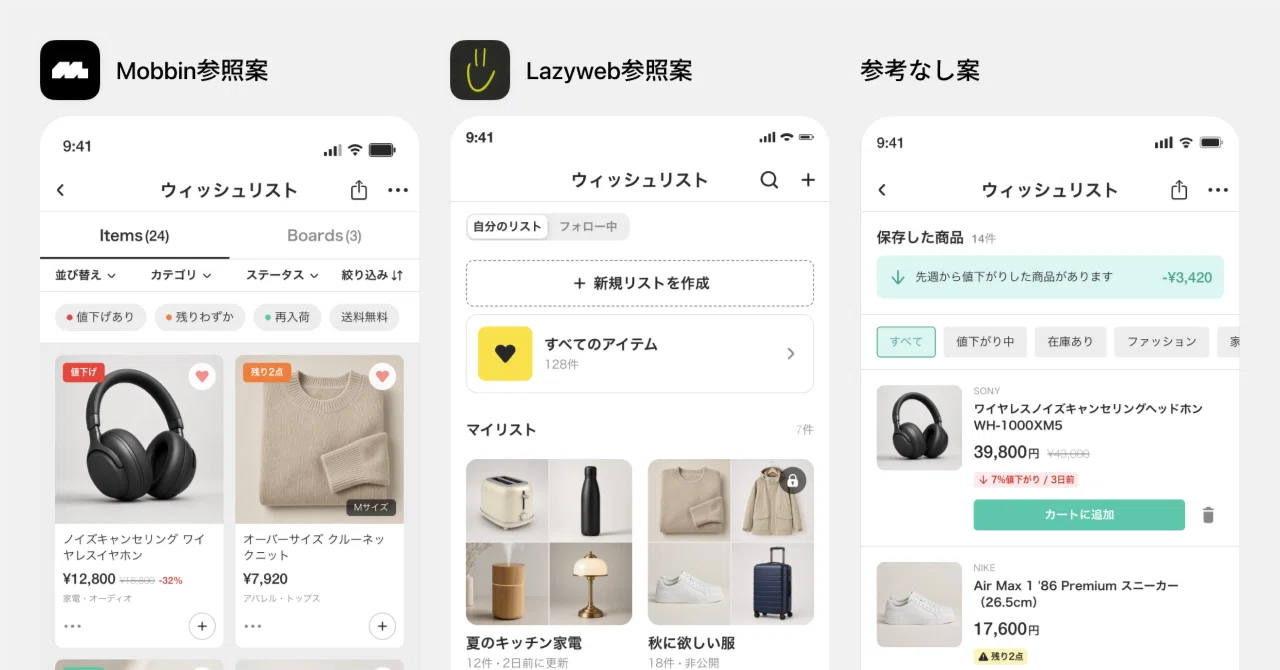
Consider a product team preparing a subscription upgrade screen. A designer asks an AI agent to compare how leading consumer apps present a paywall, including pricing hierarchy, benefit messaging, trial language, and calls to action. Mobbin’s MCP server enables the client to retrieve relevant design patterns or real app screens for the agent to examine. Mobbin’s technical expertise in the MCP server allows its AI agents to pull design patterns and real app screens over MCP, showcasing how the platform positions itself as the solution provider for design research workflows.
The agent can then help the designer identify recurring approaches, such as whether benefits appear before price, how annual and monthly plans are framed, or where reassurance copy is placed. Mobbin reports that its MCP experience can search more than 600,000 screens from shipped apps, providing the workflow with a broad range of visual examples. The objective is not to copy a competitor’s interface. It is to make a more informed decision about the conventions worth adapting for a particular audience, product, and business model.
How to Implement Mobbin MCP Server Solutions
- Choose a compatible AI client. Select the environment where the team will conduct research and design discussions.
- Connect and authorize Mobbin. Follow the client’s supported MCP setup and permission process.
- Confirm available capabilities. Ask the AI tool what Mobbin can search or retrieve.
- Use focused prompts. Include a product category, screen type, user objective, or interaction pattern.
- Review the references. Check whether the returned examples fit the intended market, platform, and use case.
- Record the decision. Capture why a pattern was selected, adapted, or rejected.
Understanding the MCP server meaning also means recognizing that the technical setup is only one part of the implementation. Teams need prompt conventions, appropriate access controls, review standards, and a clear expectation that AI summaries serve as inputs to design work rather than as final approval.
Strategic Advantages for Product Teams
Mobbin can support faster research by reducing the need for repeated context gathering. It can also establish a shared visual basis for critique, helping designers, researchers, developers, and product leaders discuss concrete examples rather than relying on memory or personal preference. Mobbin’s query analysis of 317,427 requests from 10,105 designers found leading requests on topics such as login screens, onboarding welcome screens, dashboards, and empty states, reflecting the research-oriented nature of many design workflows.
The strategic advantage is not one-click design generation. It is a more connected process for exploring proven patterns, asking sharper questions, and giving AI agents relevant material to analyze. When used carefully, Mobbin MCP Server Solutions help teams move from a vague interface problem to a grounded, reviewable design direction.