
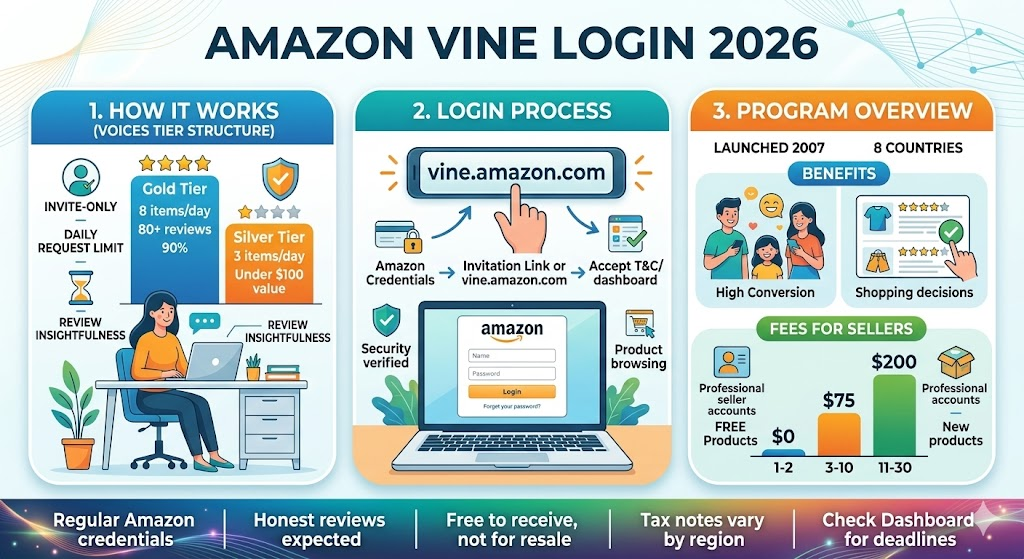
If you have searched for Amazon Vine login, you are probably trying to find the correct way to access Amazon Vine, check your Vine dashboard, or understand why the program is not appearing in your Amazon account. Amazon Vine can seem confusing at first because it is not simply a separate shopping website where anyone can create an account and sign up. Access depends on whether you are an invited Vine Voice or an eligible Amazon selling partner using Vine through Seller Central.
Amazon Vine is designed around product reviews. Amazon invites selected reviewers, known as Vine Voices, to try eligible products and share honest opinions. For sellers, Vine provides a way to introduce eligible products to invited reviewers and collect customer feedback. Amazon explains that Vine Voices are selected based on the insightfulness of reviews they have published on Amazon, rather than through a normal public registration process.
Because of that structure, searching for the right Amazon Vine login page can lead to confusion. The correct access method depends on your role. Sellers generally access Vine from Seller Central, while Vine Voices use the Amazon account and Vine experience associated with their invitation. Understanding this difference makes the login process much easier.
What Is Amazon Vine?
Amazon Vine is a review program created to help shoppers make more informed purchasing decisions. Amazon connects participating sellers with a group of invited reviewers called Vine Voices. These reviewers can request eligible products, receive them at no product charge, use or evaluate them, and then provide their honest opinions through Amazon reviews.
The important point is that Vine is not simply a website where anybody can register as a reviewer. Amazon says Vine Voices are invited based on the quality and insightfulness of reviews they have already published. This means having an ordinary Amazon shopping account does not automatically make someone eligible for Vine.
For sellers, the system works differently. Eligible selling partners can access Vine from Seller Central and enroll qualifying products. Amazon’s current seller information says participating sellers need a Professional selling plan and must meet other program requirements, including applicable brand and fulfillment requirements. Vine therefore serves two connected groups: selected reviewers who provide feedback and eligible sellers who make products available for review.
How Amazon Vine Login Works for Vine Voices
If you are already a Vine Voice, your first step is generally to use the Amazon account associated with your Vine participation. There is not necessarily a separate public “Amazon Vine account registration” process that anyone can complete. Vine access is connected to Amazon’s invitation and account system.
Once access is available to an invited reviewer, the Vine area allows that person to browse products made available through the program, review products they have received, and manage relevant Vine activities. The exact appearance of the experience can change over time as Amazon updates its website, account pages, and program features.
This is why it is important to be cautious when searching online for an Amazon Vine login. If a third-party website claims that you can pay a fee to become a Vine Voice or asks you to provide your Amazon password outside an official Amazon page, you should treat that as a warning sign. Vine participation is based on Amazon’s own invitation and eligibility system, so unofficial “registration” services should not be necessary.
Amazon Vine Login for Sellers
For sellers, the login process is more straightforward. Amazon states that sellers access Vine through Seller Central. After signing into the appropriate Seller Central account, eligible sellers can navigate to the Vine section from the advertising area of the dashboard.
Once inside the Vine dashboard, sellers can see products that may be eligible for enrollment and manage their Vine activity. Amazon says sellers can search for eligible FBA ASINs, choose the number of units to make available, and monitor claimed quantities and published reviews from the Vine dashboard.
This distinction is worth remembering when searching for Amazon Vine login information. A seller should not expect the same interface as a Vine Voice. Seller access is connected to Seller Central and the seller’s eligibility, while Vine Voices participate through Amazon’s invitation-based reviewer program.
What You Need Before Accessing Amazon Vine as a Seller
Getting into Seller Central does not automatically mean that every seller can use Vine. Amazon has specific eligibility requirements for products and selling accounts. Current Amazon information states that sellers need a Professional selling plan to participate, and branded products generally need to meet applicable Brand Registry requirements.
Product eligibility is also important. Amazon currently lists requirements including an FBA listing, fewer than 30 reviews on the product detail page, an image and description, and available FBA inventory. Certain product categories, including adult, digital, and bundled products, are excluded under Amazon’s stated requirements.
That means a seller may successfully log into Seller Central but still fail to see an eligible Vine option for a particular product. This does not necessarily indicate a login problem. In many cases, the issue is related to account eligibility, product eligibility, fulfillment settings, brand status, inventory, or other program requirements.
How to Find the Correct Amazon Vine Login
The safest approach is to begin from Amazon’s official website rather than clicking an unfamiliar login advertisement or third-party link. Sellers can sign into Seller Central and then look for the Vine option under the relevant dashboard navigation. Amazon’s own seller documentation identifies the route through Seller Central and the Advertising menu.
For Vine Voices, access is tied to the Amazon account associated with their Vine participation. If you have received an official invitation, follow the instructions provided through your Amazon account or official Amazon communication rather than trying to create a separate Vine account somewhere else.
It is also worth checking the domain carefully before entering credentials. A legitimate Amazon login should be hosted on an official Amazon domain. Avoid pages that imitate Amazon’s branding but use unusual domain names, misspellings, shortened links, or requests for unnecessary personal information. When dealing with an account that contains payment details, order information, or business data, taking an extra few seconds to verify the website is a smart security habit.
Common Amazon Vine Login Problems
One common issue is that someone searches for Amazon Vine login but cannot find a registration button. This can be completely normal. Vine Voices are not simply open to everyone, and Amazon selects reviewers for participation. If you have not been invited, repeatedly searching for a separate public signup form is unlikely to solve the problem.
Another issue occurs when sellers can access Seller Central but cannot find Vine. In that situation, checking the account’s eligibility and product requirements is more useful than repeatedly attempting to log in. Amazon’s documentation explains that Vine participation is limited to qualifying sellers and products, so access to Seller Central alone does not guarantee Vine eligibility.
Password and browser problems can also interfere with access. If the Amazon login page repeatedly redirects, fails to load, or returns an authentication error, try using the official Amazon login page, checking your internet connection, updating the browser, clearing problematic cached data, or using another trusted browser. Never send your password to someone claiming they can “activate” Vine for you.
What Vine Voices Actually Do After Logging In
Once a reviewer has legitimate Vine access, the purpose of the platform becomes much clearer. Vine Voices browse products that are available to them, select products that interest them, receive those products, and provide reviews based on their actual experience.
The quality of the review is especially important. Amazon describes Vine Voices as reviewers selected for the insightfulness of their previous reviews. The objective is not simply to produce positive ratings. Instead, the program is intended to provide honest, useful opinions that can help other customers understand a product before purchasing it.
Vine Voices should therefore approach reviews like genuine product evaluations. Mentioning strengths, weaknesses, usability, build quality, fit, performance, packaging, or other relevant details can make a review much more useful than simply saying that a product is “good.” The reviewer should describe their actual experience rather than writing what they think the seller wants to hear.
Why Amazon Vine Matters to Sellers
For sellers, Vine can be particularly useful when launching products that do not yet have much customer feedback. A new listing can look less convincing to shoppers when there are no reviews, even if the product itself is excellent. Vine gives eligible sellers an opportunity to put products in front of invited reviewers and collect feedback.
Amazon says Vine can help sellers collect high-quality reviews and improve product discoverability. The company currently advertises the possibility of up to 30 reviews for eligible products and reports an average sales lift associated with Vine participation, although results naturally vary by product and seller.
However, sellers should not think of Vine as a system for guaranteeing positive reviews. The value of the program comes from independent opinions. A product may receive praise, criticism, or a mixture of both. For a serious brand, that feedback can be valuable because it may reveal problems with the product listing, packaging, instructions, design, or customer experience before the product reaches a much larger audience.
Amazon Vine Login Security Tips
Security should always be part of the Amazon Vine login process. Whether you are a seller or a reviewer, use only trusted Amazon pages when entering account credentials. Do not give your password, verification codes, or security information to anyone who claims to provide special Vine access.
Two-factor authentication is another useful layer of account protection. If your Amazon account supports additional verification options, enabling them can reduce the risk associated with stolen passwords. This is especially important for sellers because Seller Central accounts can contain sensitive business information.
Finally, be skeptical of offers promising guaranteed Vine membership. Amazon’s program is not a typical paid membership club for reviewers. Vine Voices are invited by Amazon, while sellers must meet program requirements. If someone says they can sell you a Vine invitation, activate a hidden account, or guarantee positive Vine reviews, it is best to avoid the offer and rely on official Amazon channels instead.
Final Thoughts on Amazon Vine Login
The phrase Amazon Vine login sounds simple, but the correct access method depends heavily on whether you are a Vine Voice or an Amazon seller. Vine Voices participate through Amazon’s invitation-based reviewer program, while eligible sellers access Vine through Seller Central. Understanding this difference can save considerable time and prevent confusion.
For sellers, the most important step is to make sure the selling account and products meet Amazon’s current Vine requirements. For reviewers, the key is understanding that Vine is invitation-based rather than a public program that anyone can simply sign up for. Amazon states that Vine Voices are selected based on the insightfulness of their reviews, which helps explain why there is no conventional open registration process.
If you are trying to access Amazon Vine today, start with the official Amazon account environment associated with your role. Sellers should use Seller Central, while invited Vine Voices should use the Amazon account connected with their Vine participation. Taking this approach is safer, clearer, and more reliable than relying on third-party websites claiming to offer special Amazon Vine login access.
You May Also Read: Wordmaticz