
What Does SFM Compile Mean?
The term SFM compile is most commonly associated with Source Filmmaker (SFM), Valve’s animation and filmmaking tool built around the Source engine. In simple terms, compiling in an SFM workflow generally refers to preparing certain assets so that the program can properly recognize, load, and use them. Depending on what someone is working with, this can involve models, textures, materials, or other files that need to be converted into formats the Source engine understands.
For newcomers, the word “compile” can sound more complicated than it really is. SFM projects often involve several different types of files, and each one has a specific role. A model might contain geometry and rigging information, while textures provide the visible surface appearance. Compiling is essentially part of the process that turns source assets into usable game-engine assets. Once the files are prepared correctly, they can be imported into an SFM project and used for animation, posing, lighting, and rendering.
Understanding the idea behind SFM compile is useful even if you never create custom assets yourself. Many downloadable models and community-made resources are already compiled, meaning you can simply install them and use them. However, when something does not appear correctly, produces an error, or refuses to load, knowing how the compilation process works can make troubleshooting much easier.
Why Compilation Matters in Source Filmmaker
Source Filmmaker was designed around the Source engine, which has its own structure and expectations for assets. SFM cannot simply take every ordinary 3D file and immediately understand it as a functional character or prop. Assets need to contain the information the engine expects, including things such as model data, materials, textures, and sometimes animation-related information.
This is where compilation becomes important. A properly compiled asset can communicate with the engine in a predictable way. For example, a character model may need a skeleton, hitboxes, material assignments, and other information before it behaves properly inside SFM. If one part of that process is missing or incorrectly configured, the result can range from a model appearing invisible to textures showing as bright colors or the asset failing to load altogether.
Compilation also helps organize the relationship between different asset files. A model is rarely just one file sitting by itself. It can depend on textures, material definitions, and other supporting resources. When everything has been prepared and placed in the correct directories, SFM has a much better chance of finding the resources it needs. This is one reason experienced SFM users pay close attention to file paths and folder structures.
Understanding the SFM Asset Workflow
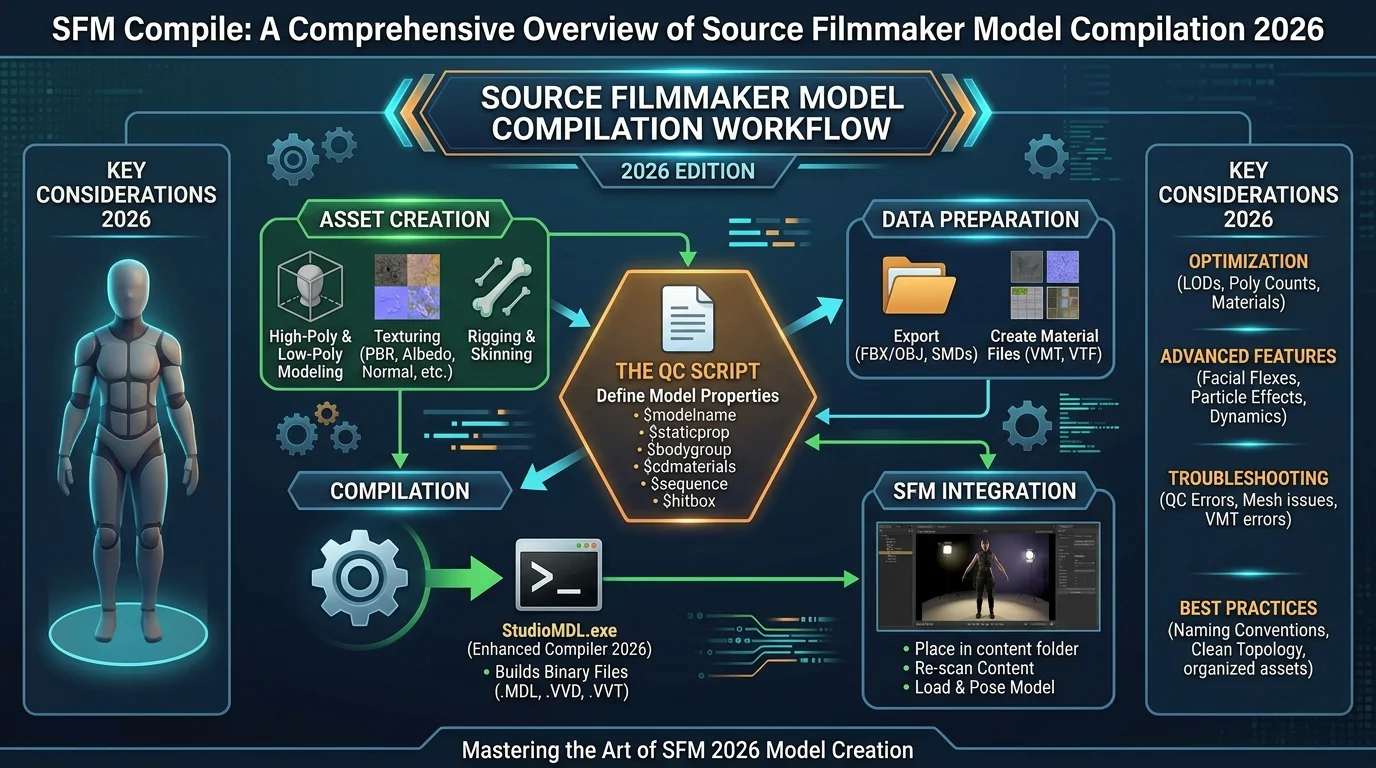
A typical SFM asset workflow starts with a source asset. Depending on the project, this could be a character created in a 3D application, a prop designed for a scene, or an existing asset being modified for a particular purpose. The source file itself is not necessarily ready for direct use in Source Filmmaker, so it must be prepared according to the requirements of the Source engine.
The next stage involves exporting or converting the asset into formats appropriate for Source. Different tools can be involved depending on the asset type and the creator’s workflow. Model creators often work with dedicated modeling software before moving into Source-specific compilation tools. Textures may also need to be converted into formats compatible with Source materials.
After the necessary files have been prepared, they are normally placed into the appropriate SFM or game directory structure. The exact folder arrangement matters because Source-based applications rely heavily on predefined search paths. A technically correct model can still appear broken if its supporting files are stored somewhere SFM does not search.
Common Problems With SFM Compile
One of the most common problems users encounter is a model that appears completely invisible. This can happen for several reasons, including an incorrectly compiled model, missing files, an improper installation, or a problem with the model’s configuration. Before assuming the compilation itself is broken, it is worth checking whether all required files were installed in the correct location.
Missing textures are another familiar issue. A model may load successfully while appearing unusually bright, dark, or covered with a default-looking material. This generally suggests that SFM can locate the model but cannot find one or more of the textures or material definitions associated with it. Checking the material paths and texture locations can often reveal the problem.
Compilation errors can also result from configuration problems. A small mistake in a model definition, material reference, or compilation setting may prevent the resulting asset from functioning correctly. When troubleshooting, it is better to examine the process one stage at a time rather than changing many settings simultaneously. That makes it easier to identify the actual cause.
Tools Commonly Used for SFM Compilation
SFM compilation workflows can involve several different tools, and the best choice depends on what is being created. Modeling applications are commonly used to build or edit the original geometry. Source-specific utilities are then used to convert that work into formats that the Source engine can understand.
Crowbar is one example of a tool frequently associated with Source-engine model workflows. It can be useful for tasks involving compilation and decompilation of Source models, although users should always make sure they understand which version of the Source engine and which asset format they are working with. Different Source-based applications do not necessarily behave identically.
Other tools may be used for textures, material preparation, or file management. The important point is that there is no single universal “SFM compile” button that solves every asset problem. A successful workflow depends on understanding what each file does and which stage of the pipeline is responsible for producing it.
How to Approach an SFM Compile Project
The easiest way to avoid unnecessary frustration is to start with a small project. Instead of immediately attempting to compile a complicated character with multiple materials and advanced features, begin with a simple prop. A basic object lets you learn the workflow without having to troubleshoot rigging, complex materials, or numerous dependencies at the same time.
Keep the project organized from the beginning. Give files sensible names, maintain a predictable folder structure, and avoid moving supporting resources around randomly. Source-engine workflows can be particularly sensitive to file paths, so organization is not merely cosmetic. It can directly affect whether the final asset works correctly.
It is also helpful to keep notes about the settings used during compilation. If one version works and another does not, those notes can make comparison much easier. Experienced creators often develop their own repeatable workflows because consistency reduces errors. Once you understand a process that reliably produces working assets, you can adapt it for larger and more complicated projects.
Tips for Troubleshooting SFM Compile Errors
When an SFM compile fails, start with the simplest possible explanation. Check the file paths, verify that the required files exist, and confirm that the tools are pointing to the correct directories. Many problems that initially look like complicated technical failures are actually caused by a missing dependency or a misplaced file.
Next, examine the error messages carefully. Error messages can appear intimidating, but they often contain useful clues. A reference to a missing file, invalid material, or unavailable model can tell you which part of the pipeline needs attention. Instead of repeatedly compiling the same project without changes, use the message to identify one specific issue and test a targeted fix.
Finally, test your asset in a clean environment when possible. If a model works in one setup but fails in another, the problem may be related to the installation or conflicting files rather than the model itself. Keeping backups of working versions is also a smart habit. It allows you to experiment without permanently damaging a functioning project.
Improving the Quality of Compiled SFM Assets
Successful compilation is only the beginning. A technically functional model can still have problems with its appearance or performance. Good asset preparation involves paying attention to geometry, textures, materials, and overall complexity. An unnecessarily heavy model can make an SFM session harder to manage, especially when a scene contains many detailed characters and props.
Materials deserve particular attention because they strongly influence the final visual result. Correct textures and material settings help ensure that the model looks as intended under SFM lighting. If the original asset was created for a different rendering environment, some adjustments may be necessary to achieve a convincing result inside Source Filmmaker.
Optimization is equally important. SFM scenes can become demanding when they contain high-resolution textures, complex models, particle effects, and numerous lights. A well-prepared asset should balance visual quality with reasonable performance. This becomes especially valuable when creating longer animations or complicated scenes where smooth editing is important.
SFM Compile for Beginners
For beginners, the best approach is to treat compilation as part of a larger creative pipeline rather than as a mysterious technical process. Learn what each file does, understand where the files belong, and become familiar with the relationship between models, materials, textures, and the Source engine.
You do not need to master every advanced technique immediately. Start by installing an existing, properly prepared asset and observing how its files are organized. From there, experiment with simple modifications before attempting a complete custom model. This gradual approach gives you practical experience without overwhelming you with too many variables.
Most importantly, expect some trial and error. Source Filmmaker is an older tool with a large community-created ecosystem, and workflows can differ depending on the asset and the tools involved. A failed compile is not necessarily a sign that the project is impossible. It is usually an opportunity to identify which part of the pipeline needs adjustment.
Final Thoughts on SFM Compile
Understanding SFM compile becomes much easier once the process is viewed as a series of practical steps rather than a single complicated operation. Source Filmmaker needs assets in formats and structures that the Source engine can recognize, and compilation helps transform prepared source material into usable engine assets.
Whether you are working with characters, props, or custom environments, careful file organization and a methodical workflow can prevent many common problems. Missing textures, incorrect paths, incompatible settings, and incomplete asset dependencies are among the issues worth checking first when something goes wrong.
Ultimately, learning how SFM compilation works gives creators more control over their projects. Instead of relying entirely on pre-made resources, you can begin understanding how custom assets are prepared and brought into your scenes. With patience, good organization, and a willingness to troubleshoot, the SFM compile process can become a useful part of a much larger animation and filmmaking workflow.
You May Also Read: Wordmaticz